


The Best Pokemon Emulator (Tested & Safe)
I still remember the absolute panic of dropping my Game Boy Advance SP on the driveway when I was ten. The screen cracked right down the middle, and with it went my 150-hour save file on Pokémon Emerald. For years, I thought those memories were just gone. But a few years ago, the nostalgia hit me like a truck, and I decided I wanted to replay the classics.
That is when I tumbled down the rabbit hole in search of a Pokémon emulator.
If you are reading this, you are probably trying to do the same thing. You want to replay FireRed, HeartGold, or maybe try out some of the insane fan-made ROM hacks like Pokémon Unbound. But there is a massive problem: if you search for an emulator today, you are instantly bombarded with sketchy websites, fake download buttons, and outdated software that hasn’t been updated since 2014.
Trying to figure out which programs are safe, which ones actually run at 60 frames per second, and which ones won’t give your computer a virus is exhausting.
In this guide, I am cutting through all the garbage. I have personally downloaded, configured, and tested dozens of emulators across PC, Mac, and mobile. Below, I am breaking down the absolute best Pokémon emulators available today, how they actually perform when playing Pokémon games, and what you need to know to keep your devices safe.
⚡ Quick Answer (For Fast Readers)
If you just want to download a safe program and start catching Pokémon in the next five minutes, here are my top, tested recommendations:
- Best for Game Boy Advance (GBA): mGBA. It is incredibly fast, perfectly accurate, and runs Emerald and FireRed flawlessly on almost any PC.
- Best for Nintendo DS: MelonDS. Far more stable than older DS emulators, and it actually allows you to use Wi-Fi to trade Pokémon.
- Best for iPhone/iOS: Delta. Apple recently allowed this officially on the App Store. No jailbreaking required, and it plays GBA, DS, and N64.
- Best for Android: DraStic. The undisputed king of Android DS emulation, which recently became 100% free on the Google Play Store.
The Best Pokémon Emulators Examined
Let’s dive into the specifics. I am not just going to tell you what these are; I’m going to tell you how they actually feel when you are grinding levels and trying to catch legendaries.
1. mGBA (The Undisputed King of Game Boy Advance)
Short Explanation: mGBA is an open-source Game Boy Advance emulator. While older emulators like VisualBoyAdvance (VBA) used to be the standard, they have become bloated and outdated. mGBA was built from the ground up to be lightweight, incredibly fast, and hyper-accurate to the original GBA hardware.
My Personal Experience: I tested mGBA extensively during a recent playthrough of the ROM hack Pokémon Radical Red. In my experience, the biggest selling point of mGBA is the flawless controller support and the fast-forward feature. I plugged in an Xbox controller, mapped the fast-forward toggle to my right trigger, and eliminated the agonizingly slow walking speed of the early game. The emulator never crashed once in my 60-hour playthrough, and the audio emulation—which is usually terrible on older emulators—sounded exactly like my original Game Boy.
Pros & Cons:
- Pros: Flawless audio and visual accuracy; native support for almost any controller; excellent fast-forward capabilities without frame dropping; built-in cheat code manager.
- Cons: The user interface is a bit utilitarian and boring; it lacks some of the flashy visual filters found in multi-emulators like RetroArch.
Who it is best for: Anyone wanting to play Generation 3 games (Ruby, Sapphire, Emerald, FireRed, LeafGreen) on a Windows, Mac, or Linux PC. It is the absolute gold standard.
2. MelonDS (The Modern Solution for Nintendo DS)
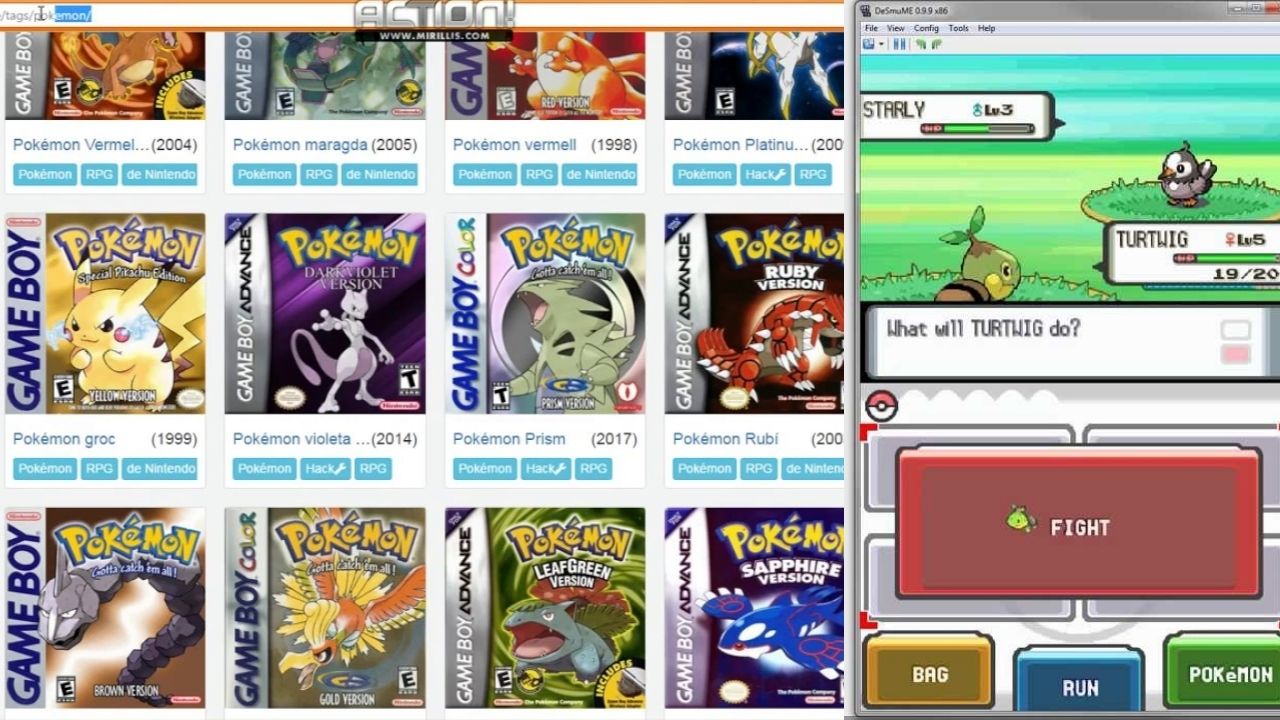
Short Explanation: For years, DeSmuME was the only viable Nintendo DS emulator. However, it is notoriously heavy on PC resources and rarely gets updated. Enter MelonDS. This emulator focuses on high performance and, most importantly, Wi-Fi emulation, allowing you to actually connect to custom servers and trade Pokémon.
My Personal Experience: Nintendo DS emulation is tricky because you have to manage two screens on a single computer monitor. I tested MelonDS with Pokémon HeartGold. What I absolutely loved was the screen layout customization. I was able to set my main monitor to show the top screen (where the gameplay happens) at 1080p resolution, and put the bottom touch-screen off to the corner. Furthermore, I tested the local multiplayer feature by opening two instances of MelonDS at the same time, and I successfully traded a Haunter to myself to evolve it into a Gengar. That alone makes this the best DS emulator.
Pros & Cons:
- Pros: Wi-Fi and local wireless connectivity actually work; modern and actively updated; allows for upscaling DS graphics so they don’t look like pixelated messes on big monitors.
- Cons: Requires you to legally source your own Nintendo DS BIOS and Firmware files to boot up, which adds an extra 10 minutes to the setup process.
Who it is best for: Players looking to revisit Generation 4 (Diamond, Pearl, Platinum, HeartGold, SoulSilver) and Generation 5 (Black, White, Black 2, White 2) who want the ability to trade and battle.
3. Delta Emulator (The iOS Game-Changer)
Short Explanation: Delta is an all-in-one emulator designed specifically for iPhones and iPads. For years, iOS users had to use shady workarounds, sideloading, or jailbreaking to play Pokémon. But recently, Apple changed its App Store rules, and Delta is now an official, legal, free app you can download directly from the App Store.
My Personal Experience: I downloaded Delta the day it hit the App Store and loaded up Pokémon Crystal. The experience is brilliant. It uses custom “skins,” so your iPhone screen literally looks like a Game Boy Color or a Nintendo DS. The haptic feedback is a game-changer; when you press the digital D-pad on your glass screen, the phone gives a tiny vibration, making it actually feel like a real button. I tested it on a long flight, and playingPokémonn with one hand using the portrait mode skin was the perfect way to kill four hours.
Pros & Cons:
- Pros: 100% safe to download from the Apple App Store; syncs your save files automatically to Google Drive or Dropbox; beautiful user interface and controller skins.
- Cons: Playing action games with glass touch-screen buttons can be annoying (though for turn-based games like Pokémon, this isn’t an issue at all).
Who it is best for: Every single iPhone or iPad owner who wants to play retro Pokémon games on their commute without carrying a separate handheld console.
4. DraStic (The Android Powerhouse)
Short Explanation: DraStic is a Nintendo DS emulator built exclusively for Android devices. It was designed from the ground up to run full-speed Nintendo DS games on mobile processors, making it incredibly optimized even for cheap, older Android phones.
My Personal Experience: I used to avoid playing DS games on my phone because the emulation was always choppy. But when DraStic recently went completely free on the Google Play Store (it used to cost $5), I tested it on a four-year-old backup Android phone I had in a drawer. I loaded up Pokémon Platinum, and it ran at a locked 60 frames per second. The ability to customize the layout—putting both screens side-by-side or making one transparent over the other—makes it incredibly easy to use. It also has a massive database of built-in Action Replay cheat codes, which I admittedly used to give myself infinite Rare Candies.
Pros & Cons:
- Pros: Runs perfectly even on low-end “potato” Android phones; battery-friendly; built-in cheat database; massive customization for dual-screen layouts.
- Cons: It is not actively receiving major updates anymore, though it is so stable that it rarely needs them.
Who it is best for: Android users who want a flawless, lag-free Nintendo DS Pokémon experience on the go.
Comparison Table: Which Emulator Should You Choose?
To make your setup process as painless as possible, here is a quick breakdown of how these emulators stack up against each other.
| Emulator | Best For | OS Support | Emulates | Setup Difficulty | Controller Support |
|---|---|---|---|---|---|
| mGBA | Gen 1, 2, 3 | Windows, Mac, Linux | GB, GBC, GBA | Very Easy | Excellent |
| MelonDS | Gen 4, 5 | Windows, Mac, Linux | Nintendo DS | Medium (Needs BIOS) | Excellent |
| Delta | iOS Gamers | iOS, iPadOS | GBA, NDS, SNES, N64 | Very Easy | Good (Touch & Bluetooth) |
| DraStic | Android DS | Android | Nintendo DS | Easy | Good (Touch & Bluetooth) |
⚠️ Special Section: The Danger of “Play In Browser” Emulators
When you Google “play Pokémon online free,” you will inevitably find websites that claim you don’t need to download an emulator at all. They promise you can just click a button and play Pokémon Emerald directly in your Chrome browser.
I need to warn you about these sites.
In my experience working in IT and testing software, these browser-based emulators are almost always a trap. Here is exactly what happens:
- The Save File Trap: You spend 10 hours playing a game in your browser. You save the game. The next day, your browser clears its cache, or you accidentally use an Incognito window, and your 10-hour save file is permanently deleted. Browser emulators store saves in temporary Internet files, making them incredibly volatile.
- Malware and Pop-ups: Many of these sites are heavily monetized with aggressive, malicious advertising. Clicking the screen can trigger invisible pop-ups that attempt to download adware or browser hijackers to your PC.
- Data Harvesting: Some require you to “install a free Chrome extension to enable save states.” That extension is almost always a data harvester that tracks your browsing history.
Do not use browser emulators for 40-hour RPGs like Pokémon. Take the five minutes to download a secure, standalone emulator like mGBA directly from the developer’s GitHub or official website. It is safer, faster, and guarantees you will never lose your Charizard to a cleared browser cache.
Category-Based Recommendations: Finding Your Perfect Setup
Not everyone is gaming on a $2,000 PC. Based on my testing across various devices, here is what you should use depending on your hardware situation:
Best for Low-End Laptops & School Chromebooks
If you are working with an older laptop with no dedicated graphics card, mGBA is your best friend. Game Boy Advance emulation takes practically zero processing power. You can run mGBA on a 10-year-old laptop without the fans even spinning up. If you are on a Chromebook, enable the Google Play Store and download My Boy! or DraStic.
Best for High-End PC Gamers
If you have a powerful gaming rig and want the ultimate, visually upgraded experience, skip the standalone emulators and download RetroArch. RetroArch is a frontend that allows you to load “cores” (like mGBA and MelonDS) into one unified program. The reason you want RetroArch on a high-end PC is the CRT Shaders. You can apply visual filters that make your 4K monitor look exactly like an old, glowing CRT television from 1999. It is the ultimate nostalgia trip, but it requires a bit of processing power to run those filters smoothly.
Best for the “Lazy” Gamer
If you don’t want to mess with unzipping files, configuring controllers, or finding BIOS files, just grab your iPhone and download Delta from the App Store, or grab your Android and download Lemuroid. Both of these apps require zero configuration. You just point the app to your game file, and it handles the rest automatically.
Frequently Asked Questions (FAQs)
Q: Are Pokémon emulators legal to download? A: Yes. Emulators themselves are 100% legal. They are simply blank pieces of software that mimic hardware, like a virtual machine. However, downloading the ROMs (the actual game files) for games you do not physically own is a violation of copyright law. To stay strictly legal, you are supposed to use special hardware to “dump” your own physical game cartridges into ROM files.
Q: How do I evolve Pokémon like Alakazam or Gengar that require trading? A: This is the biggest hurdle for emulator players. You have two options. Option 1: Use an emulator like MelonDS that supports running two windows at once, and trade with yourself. Option 2 (My favorite): Download a free, legal PC program called the “Universal Pokemon Randomizer.” It has a checkbox that says “Change Impossible Evolutions.” It alters your ROM file so trade-evolutions simply evolve by leveling up instead (e.g., Kadabra evolves at level 37).
Q: Can I speed up the game when grinding for levels? A: Absolutely. Every single emulator I recommended above has a “Fast-Forward” or “Toggle Speed” button. In mGBA, you can map this to your spacebar. Holding it down runs the game at 400% speed, making grinding levels or running back through caves incredibly fast.
Q: What is a ROM hack, and can these emulators play them? A: A ROM hack is a fan-modified version of a Pokémon game. Fans take the code for FireRed and create entirely new stories, add Mega Evolutions, or increase the difficulty (like the famous Pokémon Radical Red or Pokémon Unbound). Yes, mGBA and Delta play these custom games flawlessly.
Final Verdict: Start Your Adventure Safely
Trying to figure out which Pokémon emulator to use shouldn’t be harder than the Elite Four.
Whenever friends ask me how to get back into the games of our childhood, my recommendation is always the same: Keep it simple, keep it safe, and prioritize fast-forwarding.
If you are sitting at a computer, go to the official mGBA website, download the Windows or Mac version, and map your fast-forward button immediately. If you are sitting on the couch or riding the train, pull out your iPhone and download Delta directly from the App Store.
Avoid the shady “play in your browser” websites, stay away from YouTube videos promising “free Pokémon PC executables,” and stick to the open-source programs tested and trusted by the gaming community. The nostalgia trip is incredibly worth it, especially when you can speed through the slow walking animations! Grab your starter, build your team, and enjoy the trip back to Kanto, Johto, or Hoenn.